

Selling on WhatNot can look easy from the outside.
A seller turns on a camera, shows some products, initiates an auction, and watches the bids roll in. But the camera is just the visible part.
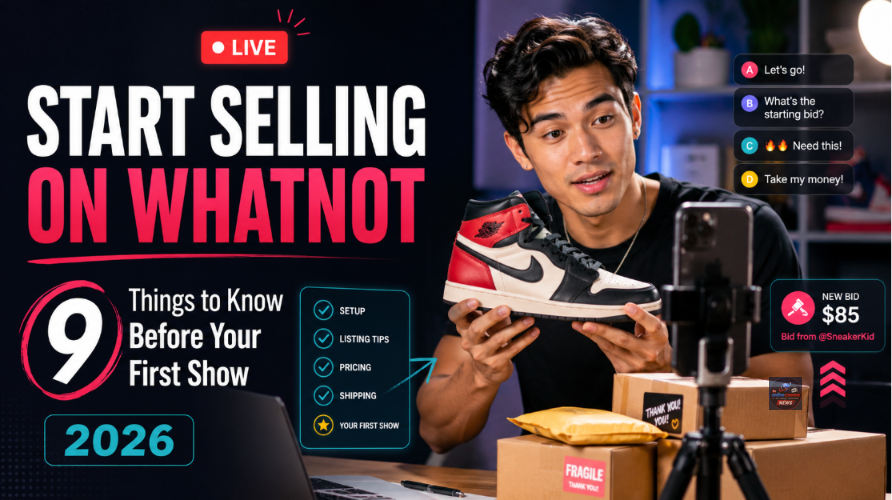
Behind every smooth Whatnot show, there are good products, clear prices, accurate shipping details, fast packing, and a host who knows how to keep people interested.
Here’s how to start selling live on Whatnot in 2026 without making your first show harder than it needs to be.
1. See if you can sell from your country.
Before investing in lights, inventory, or shipping supplies, verify if Whatnot accepts sellers from your location.
As of July 2026, Whatnot is now accepting seller applications for the following:
U.S., including Puerto Rico and U.S. Virgin Islands
Austria
Australia
Belgium
Canada
France
Germany
Netherlands
The United Kingdom
India and many other countries are not on the approved seller list right now. Your Whatnot account must be linked to a bank account in the same country and currency.
It’s easy to overlook this detail. You can download the app and watch shows, but you may not be able to open a seller account.
“Be certain you qualify before you make a Whatnot business plan.”
2. Apply within the Whatnot app.
Sign up, open the app, and tap “+”. Sell,” then tap “Get Started.”
The application requires:
Your primary product category
Your selling experience
Your regular monthly sales
Other platforms you’re on
Your social media profiles
Your legal name and return address
“Most applicants are granted seller access shortly after they apply, but some accounts may require additional review,” Whatnot says.
Be honest about your experience. You don’t have to pretend you already have a big store.
Some categories, such as luxury bags, wholesale items, and certain surprise formats, require extra approval.
3. Choose one distinct product category.
Don’t make your first show seem like a garage full of random items. Choose one main type of product, for example:
Vintage clothes
Sportscards
Coins, comics, toys
Jewelry, sneakers
Cosmetics

Shoppers find it easier to follow a focused show. It also helps Whatnot put your show in the right category, where interested buyers are more likely to see it.
Later, you can work across multiple categories. But when applying, select the category where you expect to sell most often.
A quick test: Complete this sentence—“People should watch my show because I sell ____.” If it takes three sentences to answer, your show is probably too broad.
4. Know your minimum safe selling price.
Live auctions can move quickly. That rush is part of the appeal, but it can also make sellers careless.
Calculate before the show:
Cost of product
Platform fees
Packing costs
Shipping paid by seller
Desired profit
There’s an 8% commission fee for many categories in the USA, Canada, and Australia. Payment processing is typically 2.9% of the order total plus a $0.30 transaction fee. Coins and money have a lower commission rate, and Europe and the UK may have different structures, possibly including VAT.
Whatnot does not charge fees to create or store a listing; fees are taken at the point of sale.
For example, Whatnot’s U.S. fee structure shows that an item selling for $50 will net about $44 after the 8% commission and payment-processing fees. The product cost is still deducted from that amount. Time for you!
This is why starting every item at $1 can be risky. A low opening bid can create excitement, but if there are few buyers watching, it can also backfire.
5. Start with a phone, excellent lighting, and stable internet.
You don’t need a television studio. The easiest way to get started is to stream from your phone, says Whatnot. Basic setup requirements:
A phone with a good camera
A sturdy phone stand
Uniform, bright lighting
A clean table or background
Good internet connection
A power bank or charger
Whatnot’s production guide suggests upgrading your phone setup before investing in advanced equipment. Focus on sound and lighting over decorations. Buyers need to hear you and clearly see the item’s color, size, condition, and details. A blurry camera can make a good product look suspicious.
You don’t even have to be on camera. Many sellers just show their hands and products, which can make the first show less stressful.
6. Book the show when you are not quite ready.
After approval, open Seller Hub and schedule your first show. You choose:
Show title
Date and time
Primary category
Sales format
Thumbnail image
Whatnot suggests booking about a week in advance. This gives people time to bookmark your show and gives you time to promote it on social media. A compelling title and strong thumbnail can help attract the right audience.
Avoid vague names like “My First Live!” Pick a descriptive title that tells buyers what to expect, like “Vintage Nike Jackets, Tees & Hats for Under $40.” This answers what’s for sale, brands included, and the expected price range.
7. Load your products before you go live.
Don’t leave product organization until the show starts. Pre-set your listings with the following:
Clear product names
Good pictures
Accurate condition descriptions
Selling method
Starting or fixed price
Correct packed weight
By preloading your listings, you can focus on engaging with your viewers, instead of typing product info during the stream. Place your products in the same order as your listings, and number them or store them in labeled containers. This is crucial when you have several sales in a few minutes.
8. Consider your first show to be a rehearsal.
Your initial objective shouldn’t be to become the top seller in your category. Aim for one clean, well-run show.
Here’s a simple plan:
First 5 minutes: Welcome viewers and introduce your products.
Next 30-45 minutes: Demonstrate products, answer questions, and hold auctions or fixed-price sales.
Last 5 minutes: Wrap up and let buyers know when to expect their order to ship.
Whatnot has live auctions, fixed-price listings, and giveaways. Take your time with each product, show all angles and flaws, and describe it before auctioning.

If your audience is small, don’t worry. Ten interested buyers are better than a hundred silent viewers. Some sellers use rehearsal mode (after their first show) to practice pinning products and running test auctions. Private shows are also a great way to test with friends or team members.
9. Remember, the job isn’t over once the livestream ends.
The work isn’t finished when the camera turns off. You still need to:
Check every order
Review cancel requests
Verify package weights
Print shipping labels
Pack items securely
Drop off packages
Monitor your earnings
Most sellers on Whatnot must ship within two business days of the sale. Packages must be scanned as dropped off or have other approved proof of shipment.
Getting the weights right is important because Whatnot uses them to calculate shipping, select services, and combine orders. The gross weight is the weight of the item plus the packing and packing materials.
New sellers are generally paid after delivery confirmation. When you trigger a payout, funds usually arrive within one or two business days. Experienced sellers may qualify for earlier payouts.
In other words, fast and accurate shipping is part of the sales experience, not just “back office” work.
The real secret isn’t being “good on camera.”
A successful Whatnot seller doesn’t need to sound like a TV host. Be clear, honest, organized, and consistent. Start with a product category, use what you have, set secure pricing, have listings ready before the show, and ship orders quickly.
I’m reviewing Quick Audience profits system by Rachle now, it’s a Whatot mentorship program. I’ll update the evalution report soon in OnlineCOSMOS.
Your first livestream might feel awkward. That’s normal. The better question isn’t, “What if my first show isn’t perfect?”
It’s, “What will I learn by doing the first show that I could never learn by waiting?”