

News Overview:
Google says eligible U.S. users can now use Gemini’s personalized image generation for free by connecting Personal Intelligence, Nano Banana, and Google Photos. The update makes AI image creation more personal, but users should review connected app settings and Google’s data-use rules before turning it on.
Google says eligible users in the U.S. can now use personalized image generation in Gemini for free.
The feature connects Personal Intelligence, Nano Banana, and Google Photos.
Gemini can pull actual images from a user’s Google Photos library when the user gives permission.
The main change is not just better image generation. It is Google turning personal photo libraries into a creative input for AI.
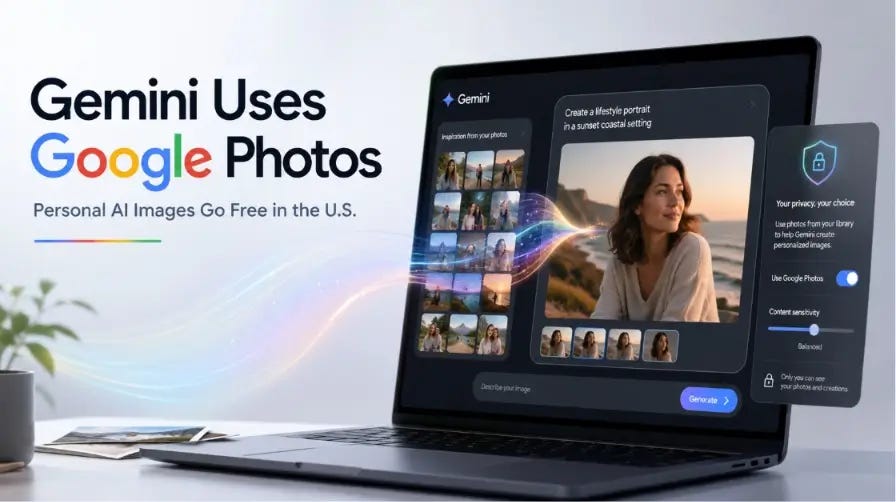
Google says eligible U.S. users can now use Gemini’s personalized image generation for free.
The feature uses Personal Intelligence, Nano Banana, and Google Photos to make images that can reflect a user’s real life, taste, and photo history.
That means users may not need to upload a reference photo every time they want a personal AI image. Google says Gemini can pull actual images from Google Photos when a user has connected the app.
TechCrunch also reported that the feature was earlier limited to Google AI Plus, Pro, and Ultra subscribers. It is now free for eligible users in the U.S.
How Gemini Uses Google Photos
Google says Personal Intelligence lets Gemini use connected Google apps, including Gmail, Google Photos, YouTube, and Search.
Gemini is really good at understanding what you want because it can look at your Google information.
For instance you do not have to write a lot about the things you like to do or the places you like to go. You can just ask Gemini to make a picture about the things you like. Google says Gemini can use connected app context to fill in some of those details.
Google also says Gemini can use labels in Google Photos, such as people and pet groups. These labels can help Gemini choose the right person, family member, or pet for an image.
Why This Is More Than Another AI Image Update
Many AI image tools start with a prompt. Some also let users upload a reference image.
Google’s new advantage is different. It can use a first-party photo library. “First-party” means data from Google’s own products, such as Google Photos, Gmail, Search, and YouTube.
That gives Gemini a creative edge if a user already stores years of photos in Google Photos. The user may spend less time uploading images and less time explaining personal details.
This is why the update matters for the AI tools market. Image generation is moving from generic prompts to personal context.
What Users Should Check Before Turning It On
Google says connecting apps to Gemini is opt-in. “Opt-in” means users choose whether to turn it on. Google also says users can adjust these connections in settings.
But users should read the privacy details before connecting their apps.
Google’s help page says connected app data may include emails, files, events, photos, videos, saved Search data, YouTube data, contact information, and location information. Google also says this data may include sensitive topics, such as health, religion, race, or confidential information.
Google says it does not directly train generative AI models on a user’s full Gmail inbox, Google Drive, Workspace apps, or the imagery and audio from a private Google Photos library. But Google also says summaries, excerpts, generated media, and inferences from relevant media, emails, and files may be used to answer prompts and train models, depending on settings.
Google also says a subset of connected app data processed by Gemini may be reviewed by human reviewers. For Google Photos, Google says reviewers may see summaries, inferences, and generated media, but usually do not view the original Photos media unless there is abuse, harm, or user feedback.
The practical advice is simple: do not connect apps that contain private or client-sensitive information unless you are comfortable with Google’s stated data rules. Google gives similar warning language in its help page.
How to Try It
Eligible users can check the feature inside Gemini.
Google’s earlier Personal Intelligence post says users can go to Gemini > Settings > Personal Intelligence > Connected Apps to manage connected apps such as Gmail and Photos.
Google’s Gemini image page says users can access Nano Banana by choosing Create images from the tools menu, then adding a prompt or uploading an image.
If you cannot see this feature it is probably because you are not allowed to use the feature. Google says not everyone can use it. Its actually meant for people who’re eighteen years old or older.
What This Means for Creators
For creators, the update could make personal-brand visuals faster.
A creator may be able to make images that include their look, family, pets, favorite places, or personal style without uploading the same reference photos again and again.
This could help with profile visuals, thumbnails, social posts, personal mood boards, and simple campaign ideas.
The risk is accuracy. Google says Gemini may not always pick the exact photo or detail the user wanted. Google says users can refine the result, choose a different reference photo, or check the sources used.
What This Means for Marketers and Agencies
This is news, for people who do marketing. It means that the tools that use intelligence to make things are getting better at knowing what is going on.
“Context-aware” means the tool can use more background information before creating something. In this case, that background can come from Google Photos and other connected Google apps.
This could help with faster visual drafts, creator assets, founder-led content, lifestyle images, and brand storytelling.
But agencies should be careful. Client photos, customer data, private files, and internal documents should not be connected to AI tools without clear permission and a data policy. Google’s own help page warns users not to connect apps if they contain personal or confidential information they would not want used for AI training or seen by a reviewer.
How Gemini Compares With ChatGPT, Canva, Adobe Firefly, and Meta AI
ChatGPT has its own image tools. OpenAI says ChatGPT Images 2.0 is built for complex visual tasks and stronger text rendering. (Source: OpenAI)
Canva focuses on making AI images inside a design workflow. Gemini has a tool that lets you make pictures and art from the things you write.
Adobe Firefly focuses heavily on commercial safety. Adobe says Firefly models are trained on licensed content, such as Adobe Stock, and public-domain content where copyright has expired.
Meta AI offers free AI image generation from prompts through Meta AI.
Gemini’s new angle is personal context from Google’s own app ecosystem. That is the part rivals may find hard to copy at the same scale, because Google Photos is already where many users store their personal image history.
What Happens Next
The first thing to watch is whether Google expands free personalized image generation beyond eligible U.S. users. Google’s June 29 announcement names eligible users in the U.S.
The second thing to watch is how users respond to the privacy trade-off. Personalized images may be easier to make, but they require users to connect more of their Google data to Gemini.
The third thing to watch is how AI image comparison pages change. Any site ranking for “best AI image generators,” “Gemini vs ChatGPT image generation,” or “AI image tools for creators” should update its content now.
News Summary:
Google is making Gemini’s personalized image generation free for eligible U.S. users.
The feature matters because it links Gemini image creation with Google Photos. With permission, Gemini can use a person’s real photo library and connected Google app context to make more personal images.
For users, the benefit is speed and easier personalization. The trade-off is privacy. Before turning it on, users should check connected app settings, Gemini Apps activity, and Google’s rules for data use and human review.
For creators and marketers, this points to a larger shift. AI image tools are moving beyond prompts. They are starting to use personal and brand context as part of the creative process.