

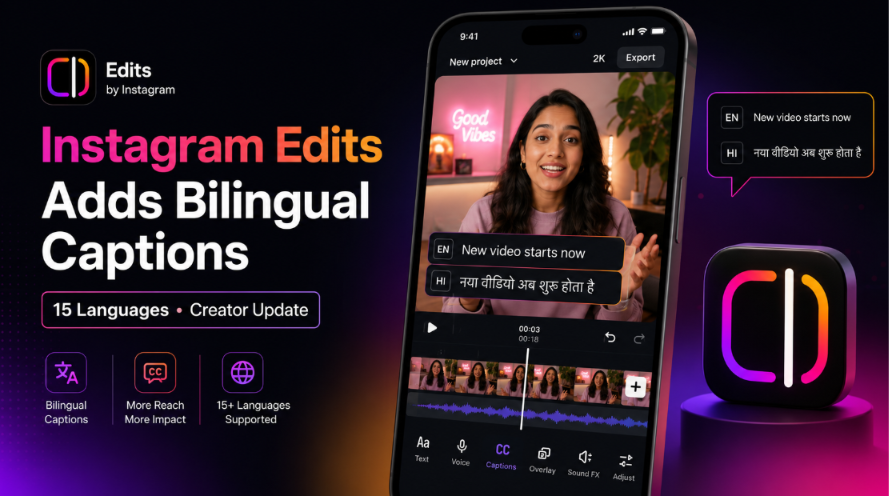
Instagram Edits now supports automatic bilingual captions in 15 reported languages, including Hindi, Bengali, Gujarati, and Kannada. Creators should check the translated words and the timing of the captions, because the feature isn’t guaranteed to be accurate or reach more Reels.
News Briefs:
On July 1, 2026, Instagram introduced bilingual captions to its Edits video app.
The feature automatically translates generated captions into a second language.
Published reports say it supports 15 languages, including Hindi, Bengali, Gujarati, and Kannada.
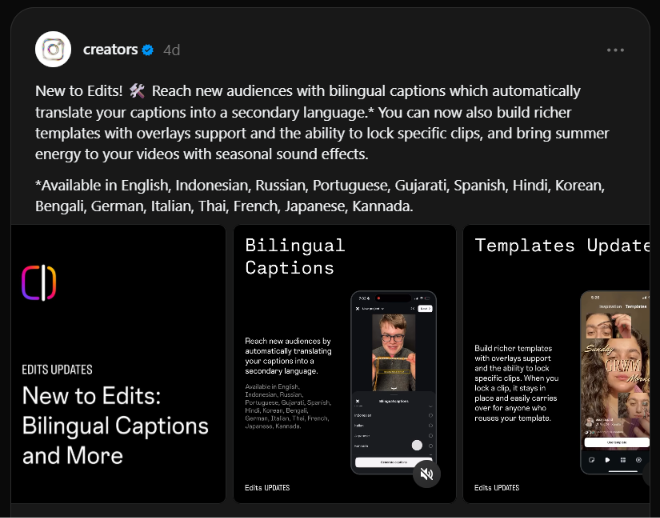
Edits also added stronger templates, clip locking, overlay support, and seasonal sound effects.
Instagram has added bilingual captions to Edits, its separate video-making app.
The feature lets creators place captions in two languages on one video. That may reduce the time needed to prepare Reels for people who speak different languages.
What Did Instagram Add to Edits?
The new tool translates a video’s captions into a second language. This means a creator can show the original caption and a translated version without moving the video into a separate translation app.
Instagram describes the feature as a way to help creators reach new audiences. But the company has not said that using two languages will automatically increase views or improve ranking in the Reels feed.
That difference matters.
Bilingual captions can make a video easier to understand. They do not guarantee more reach.
Which Languages Does the New Caption Tool Support?
India Today reports the same group of 15 supported languages:
English
Indonesian
Russian
Portuguese
Gujarati
Spanish
Hindi
Korean
Bengali
German
Italian
Thai
French
Japanese
Kannada
The inclusion of Hindi, Bengali, Gujarati, and Kannada makes the update especially useful for Indian creators, local businesses, coaches, educators, and regional media pages.
However, the reported launch list does not include Tamil, Telugu, Malayalam, Marathi, Punjabi, and several other widely used Indian languages.
How Do Bilingual Captions Work?
Instagram says edits can automatically translate captions into a secondary language. The company’s short announcement does not provide a full step-by-step help guide.
The likely workflow is straightforward:
Update the Edits app.
Open or import a video.
Generate automatic captions.
If you have the choice of bilingual or second language, take that.
Choose the translation language.
Review both caption versions before export.
Button names may differ by app version or account. This workflow should be checked inside the live app before publishing a detailed tutorial.
Why This Matters for Creators
Language is one of the main limits on how far a video can travel.
A Hindi-speaking creator may have useful content for an English-speaking audience. An English-speaking brand may want to make a product video easier to follow in Hindi, Bengali, Gujarati, or Kannada.
Until now, that often meant copying captions into another tool, translating the text, fixing the timing, and adding it back to the video.
Edits bring more of that work into one app.
For creators who publish several videos each week, even a small reduction in editing time can matter.
Why Marketers and Agencies Should Pay Attention
The feature could make regional campaigns easier to produce.
An agency could create one main video and prepare bilingual versions for different markets. A coach might use English and Hindi. A local retailer might use English and Gujarati. A publisher might use English and Bengali.
But agencies should not treat automatic translation as finished copy.
Names, prices, product terms, local phrases, jokes, and calls to action often suffer from poor translations. Names, prices, product terms, local phrases, jokes, and calls to action can be poorly translated. badly. A wrong word in an advertisement can confuse viewers or change the meaning of an offer.
Expert warning: Translation quality and caption timing are separate problems. A sentence can be translated correctly but still appear too early, too late, or across the wrong scene.
Automatic Translation Still Needs a Human Review
Machine translation (software that changes text from one language to another) can make mistakes.
Creators should pay close attention to:
People’s names
Brand and product names
Prices and dates
Technical terms
Local slang
Formal and informal speech
Calls to action, such as “buy now” or “book a call”
A native speaker should review important sales, health, legal, financial, or educational content before the video is posted.
For casual content, creators should still watch the full exported video with the sound turned off. This makes it easier to spot poor timing, missing words, or captions that cover important parts of the screen.
Edits Also Added Better Templates and Clip Locking
Bilingual captions are only one part of the update.
Edits now supports richer templates with overlays. An overlay is an item placed above the main video, such as text, an image, a sticker, or another visual layer.
Creators can also lock selected clips inside a template. A locked clip stays in place when someone reuses that template, which can help protect the timing and structure of the original edit.
Instagram also added seasonal sound effects linked to summer content.
These are smaller changes, but they make edits more useful for repeat formats, such as weekly tips and product demos.
Weekly tips
Product demos
News summaries
Before-and-after videos
Customer stories
Educational series
Will Bilingual Captions Increase Reel Views?
Not by themselves.
Captions can help people understand and watch a video without sound. A second language may also make the same video useful to a larger group.
But reach still depends on the topic, opening seconds, viewer interest, watch time, sharing, and how well the video fits its audience.
Instagram has not announced a special ranking boost for videos that use bilingual captions.
Creators should test the feature instead of assuming it works.
A useful test would compare:
One video with a single language
A similar video with bilingual captions
Reach by country
Average watch time
Completion rate
Saves and shares
Comments in the second language
Run the test across several posts. One successful Reel does not prove that bilingual captions caused the result.
What Should Creators Do Now?
Start with one language pair that matches a real audience.
Do not add a second language only because the feature is new. Choose it because your analytics, comments, customers, or sales data show that people using that language already care about your topic.
Then:
Use a short video with clear speech.
Generate the original captions.
Add the second language.
Ask a fluent speaker to check the translation.
Keep text away from buttons and lower-screen controls.
Compare the post with your normal single-language videos.
The goal is not to place more words on screen.
The goal is to make the video easier for the right people to understand.
What Is Still Unclear?
Instagram’s announcement does not explain:
Whether the feature is available to every account at the same time
Whether all 15 language pairs work in both directions
How the app handles mixed-language speech
Whether creators can edit each translated word
Whether translation quality differs by language
Whether the feature affects caption files when videos are exported
These questions need hands-on testing.
Instagram Edits now gives creators a faster way to place two caption languages on one video.
That can help creators, brands, and agencies prepare content for wider audiences. It may be especially useful in India, where many viewers use more than one language online.
But automatic captions are a starting point—not a finished translation.
Use the tool to save time. Then check the words, timing, and meaning before the video goes live.